🎉 Free generations on your first purchase of each pack — up to 20 Lite videos + 20 Lite images + 10 Medium videos + 10 Pro images + 2 Pro videos.

Get started

Cline Can Generate Images Now

Cline already edits your code. With the DreamUtopia REST API, the same session can create a hero image, restyle a product shot, or turn a still into an eight-second video. Paste one skill file, ask in plain English, and the agent handles the upload, the request and the polling.

Start with a real example

These are the prompts paired with this page’s examples. Open the generator, choose an example, then adjust one detail at a time.

Repaint this stormy coastline at dusk. Keep the lighthouse and the black rocks, sweep its beam through the sea mist, and deepen the storm clouds.

Example prompt 01

Repaint this stormy coastline at dusk. Keep the lighthouse and the black rocks, sweep its beam through the sea mist, and deepen the storm clouds.

Turn this kitchen counter into a cozy autumn scene. Keep the white mug and wooden counter, add scattered cinnamon sticks, a linen cloth, and warmer low sun.
Example prompt 02

Turn this kitchen counter into a cozy autumn scene. Keep the white mug and wooden counter, add scattered cinnamon sticks, a linen cloth, and warmer low sun.

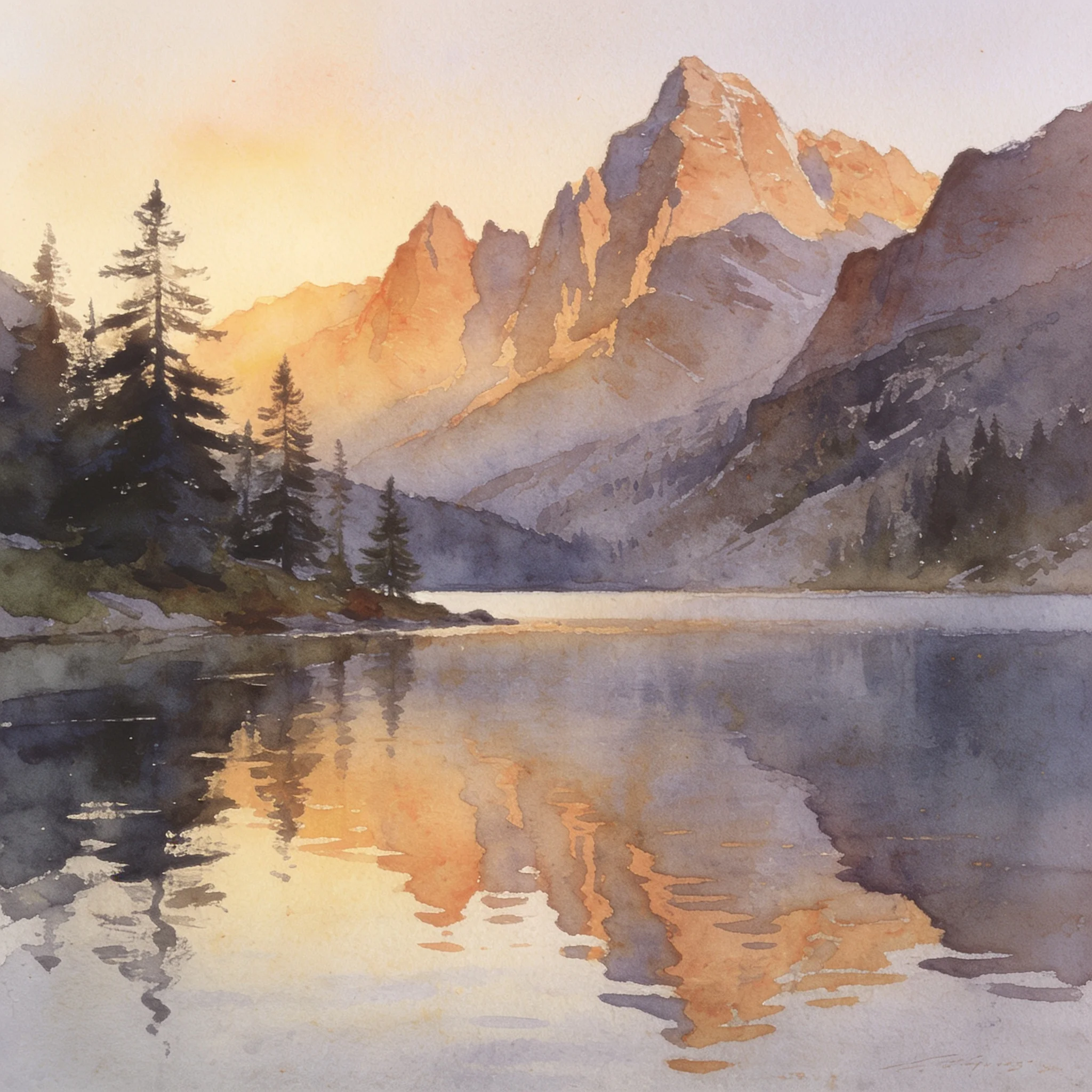
Paint this alpine lake as a loose watercolor. Keep the peaks and the reflection, soften the pine trees, and warm the dawn light.

Example prompt 03

Paint this alpine lake as a loose watercolor. Keep the peaks and the reflection, soften the pine trees, and warm the dawn light.

Cline Image Generation, Without Leaving the Editor

Cline image generation becomes a normal part of a coding session when the agent can call a media API directly. Coding agents are good at running commands, reading responses and retrying intelligently, which is exactly what a media API needs. Instead of leaving the editor to open a web app, you can ask Cline for a 16:9 header image and get a result URL back in the same conversation. We built the DreamUtopia API as plain REST for this reason. There is no MCP server to configure and no plugin to install. The skill file teaches the agent the base URL, the authentication header, the multipart upload, the two create endpoints, the polling loop and the error rules. One pasted skill and one environment variable are the whole setup. The same key also works from your own scripts, which means the agent and your build pipeline share one integration and one credit balance. That matters when a design task starts in a chat and ends in a deploy script: the request shape does not change between the two. The workflow also fits the way coding agents already work: a request is a normal shell command, a failure is a normal HTTP status, and a long job is a normal id to poll. That means Cline can explain a failure in the same voice it uses for a failing test, and it can keep the generated asset next to the code that references it. For a design-heavy repository, the difference is practical rather than cosmetic: the person writing the component is also the person who can produce the image it needs, without switching tools or losing the context of the change. Cline can run the request, read the JSON response and explain a failure without leaving the file you are editing. That feedback loop is the whole point: the agent already knows how to run a command and interpret the result, so media generation becomes another tool it can use.

What You Get

One copy-paste skill

Paste the skill block below into the Cline chat. The agent follows the recipe for the rest of the conversation without extra prompting. The text is short enough to read in one sitting and specific enough that the agent does not improvise field names. It states the exact values each field accepts, so a malformed request is corrected before it reaches the API. Nothing is written to your repository and nothing is installed.

Local files handled

The agent uploads a photo from your project with a multipart request, then passes the returned id into the generation. The limit is 30 MB for JPEG, PNG and WebP. A file that lives in the repository never needs a public URL first.

Images and video, one key

Text-to-image, image-to-image, text-to-video, image-to-video and first/last-frame transitions all use the same key and the same credit balance. You do not manage separate accounts for stills and motion, and the skill can chain one finished image into the next video request.

Jobs that outlive the chat

Every generation runs on our servers. If the session ends, the agent can list recent jobs by id and collect the result later. The signed result link stays valid for seven days, which is enough time to download it or copy it into a build artifact.

Plain-English requests

Ask for a square product shot or a vertical social clip. The skill maps your words to model, resolution, duration and aspect ratio, then checks the live price matrix before it spends. You can still name exact settings when a task needs them. The agent reports the chosen settings back to you, which makes an unexpected result easier to diagnose.

One price list

The API and the web app charge the same credits. GET /v1/models returns the live resolution, duration and credit matrix, so the agent can compare a five-second clip with a ten-second one before it creates anything.

How It Works

1

Create and export the key

Open Profile, then API keys, and create a named key. Export it as DREAMUTOPIA_API_KEY in the shell that launches Cline. Keys are available to paid accounts, are shown once, and can be revoked without touching your other integrations.

2

Paste the skill

Copy the block below and paste it into the Cline chat. The agent then knows the endpoints, field names and polling rules for that conversation. The skill also states what not to do: do not retry a refused job, and do not paste the key into the conversation. Repeat the paste in a new session; nothing is added to your repository.

3

Ask for what you need

Write a normal request: generate a 2K image of a red fox in snow, or turn ./photo.png into a 720p clip with a slow push. The agent chooses settings, can check /v1/models first, and handles the upload when the source is a local file. If the request is ambiguous, it asks one short question rather than guessing at a duration or an aspect ratio.

4

Poll and use the result

The agent polls GET /v1/generations/{id} until the job succeeds, then returns the signed result URL. It backs off between polls and stops on a editor failure instead of retrying a content-policy refusal or a spent credit balance. The final answer includes the job id as well as the link, so the result can be found again after the conversation is gone.

Paste the DreamUtopia Skill into Cline

Copy the skill below and paste it into the Cline chat. The agent then knows the API surface, the error rules and when not to retry for the rest of the conversation.

Paste into Cline
Download
> Paste this into the Cline chat. It teaches the agent the DreamUtopia API for the
> rest of the conversation. Keep the `DREAMUTOPIA_API_KEY` in your shell environment,
> not in the pasted text.

# DreamUtopia media generation

Use this skill when the user asks you to generate an image or a video with DreamUtopia.

## Prerequisites

- **API access requires a paid account.** Keys cannot be minted by a free account.
- The user sets their key in the environment:

  ```sh
  export DREAMUTOPIA_API_KEY="du_live_..."
  ```

  If `DREAMUTOPIA_API_KEY` is unset, **stop and ask the user to set it**. Never write the key
  into a project file, a commit, or a message.
- Base URL: `https://api.dreamutopia.net/v1`
- Every request sends `Authorization: Bearer $DREAMUTOPIA_API_KEY`.

## Keeping this skill current

This skill is served by the product and can change without notice. If a request fails in a way
this document does not describe — an unknown field, an unexpected status or error code, or a
route that returns `404` — the skill may be stale. Re-fetch it, paste the new version into the
conversation, and re-read it before retrying:

```sh
curl -fsSL https://dreamutopia.net/skills/dreamutopia/cline.md
```

Do not invent request fields from memory. The re-fetched file is the current contract; the copy
in the conversation is only a snapshot.

## 1. Upload a local reference image (optional)

Only needed when the user has a local file. A previous generation's `result.url` can be used
directly instead.

```sh
curl -sS -X POST https://api.dreamutopia.net/v1/uploads \
  -H "Authorization: Bearer $DREAMUTOPIA_API_KEY" \
  -F "file=@/path/to/photo.png"
```

Response `201`:

```json
{ "id": "<upload_id>",
  "url": "<upload_url>",
  "expires_at": "2026-10-31T12:00:00Z" }
```

Use `id` (not `url`) in the next request. Accepted: JPEG, PNG, WebP, up to 30 MB.
`id` only works for the account that uploaded it.

## 2. Create an image

```sh
curl -sS -X POST https://api.dreamutopia.net/v1/images/generations \
  -H "Authorization: Bearer $DREAMUTOPIA_API_KEY" \
  -H "Content-Type: application/json" \
  -d '{
    "model": "lite",
    "prompt": "a red fox in fresh snow, cinematic",
    "resolution": "2k",
    "aspect_ratio": "1:1"
  }'
```

| Field | Values |
|---|---|
| `model` | `lite`, `pro` |
| `resolution` | `2k`, `4k` (`lite` accepts `2k` only) |
| `aspect_ratio` | `1:1`, `4:3`, `3:4`, `16:9`, `9:16`, `3:2`, `2:3`, `adaptive` |
| `reference_images` | array of upload ids or DreamUtopia URLs; 0–3 for `lite`, 0–14 for `pro` |
| `prompt` | non-empty, up to 8000 characters |

`adaptive` requires at least one reference image. `resolution` defaults to `2k` and
`aspect_ratio` to `1:1`.

Response `202`:

```json
{ "id": "3f2b…", "type": "image", "status": "queued", "created_at": "2026-10-24T12:00:00Z" }
```

## 3. Create a video

```sh
curl -sS -X POST https://api.dreamutopia.net/v1/videos/generations \
  -H "Authorization: Bearer $DREAMUTOPIA_API_KEY" \
  -H "Content-Type: application/json" \
  -d '{
    "model": "medium",
    "prompt": "the fox turns and looks at the camera",
    "image": "<upload_id>",
    "resolution": "720p",
    "duration": 8
  }'
```

| Field | Values |
|---|---|
| `model` | `lite`, `medium`, `pro` |
| `resolution` | `480p`, `720p`, `1080p` (`lite` cannot use `1080p`) |
| `duration` | 5–10 seconds (`lite`), 5–15 (`medium`), 5–30 (`pro`) |
| `image` | first-frame upload id or DreamUtopia URL (omit for text-to-video) |
| `last_frame_image` | requires `image`; not supported by `lite` |
| `generate_audio` | `pro` only, and the account must hold premium; `lite` and `medium` are rejected |

Response `202` with `type: "video"`.

## 4. Poll until it finishes

```sh
curl -sS https://api.dreamutopia.net/v1/generations/$MID \
  -H "Authorization: Bearer $DREAMUTOPIA_API_KEY"
```

`status` is one of `queued`, `processing`, `succeeded`, `failed`.

- Poll every 3–5 seconds, backing off to 10 seconds. Give up after about 10 minutes.
- On `succeeded`, download `result.url`. The link is valid for 7 days.
- On `failed`, report `error.message` to the user and stop. A failed job is terminal; do
  **not** submit it again automatically.
- If an id is lost, `GET /generations?limit=20` lists recent jobs, newest first.

Terminal response:

```json
{
  "id": "3f2b…",
  "type": "video",
  "status": "succeeded",
  "model": "medium",
  "credits_used": 12,
  "created_at": "2026-10-24T12:00:00Z",
  "updated_at": "2026-10-24T12:02:10Z",
  "result": { "url": "<result_url>" },
  "error": null
}
```

## 5. Check credits and prices

```sh
curl -sS https://api.dreamutopia.net/v1/account -H "Authorization: Bearer $DREAMUTOPIA_API_KEY"
curl -sS https://api.dreamutopia.net/v1/models
```

`/models` is public and returns every tier's allowed resolutions and durations plus the
`resolution → duration → credits` matrix. Check it before choosing settings when the user
cares about cost.

## Errors

Every error body is exactly:

```json
{ "error": { "code": "insufficient_credits", "message": "You need more credits to generate." } }
```

| HTTP | Meaning |
|---|---|
| 400 | invalid input (`invalid_request`, `prompt_too_long`, `invalid_reference_image`, …) |
| 401 | missing, malformed, revoked or removed-account key |
| 402 | not enough credits |
| 403 | unpaid key creation, or audio requested without premium |
| 404 | unknown job, or a job belonging to another account |
| 409 | `Idempotency-Key` reused with a different body, or still in flight |
| 413 / 415 | upload too large / not a supported image |
| 429 | rate limited; read `Retry-After` |
| 500 / 503 | internal; retry later |

Retry only HTTP `429`, `timeout` and `internal` responses. Never retry
`insufficient_credits`, and never resubmit a job that already finished as `failed`.

## Idempotency

Send `Idempotency-Key: <unique value>` on a create request. A retry with the same key and
body returns the existing job (`200`) instead of creating and charging a second one. Use a
fresh value for every genuinely different request.

## Complete example

```sh
#!/usr/bin/env bash
set -euo pipefail
: "${DREAMUTOPIA_API_KEY:?set DREAMUTOPIA_API_KEY first}"
API="https://api.dreamutopia.net/v1"

ID=$(curl -sS -X POST "$API/images/generations" \
  -H "Authorization: Bearer $DREAMUTOPIA_API_KEY" \
  -H "Content-Type: application/json" \
  -d '{"model":"lite","prompt":"a red fox in fresh snow","resolution":"2k","aspect_ratio":"1:1"}' \
  | jq -r .id)

while :; do
  BODY=$(curl -sS "$API/generations/$ID" -H "Authorization: Bearer $DREAMUTOPIA_API_KEY")
  STATUS=$(jq -r .status <<<"$BODY")
  case "$STATUS" in
    succeeded) jq -r .result.url <<<"$BODY"; break ;;
    failed)    jq -r .error.message <<<"$BODY" >&2; exit 1 ;;
    *)         sleep 4 ;;
  esac
done
```

Explore related tools

Choose the tool that matches your next step.

Frequently Asked Questions

By the DreamUtopia Team · Last updated November 15, 2026

Do I need an MCP server to use DreamUtopia from Cline?

▼
No. The API is plain HTTP, and the skill teaches Cline to call it with curl. You do not need an MCP server, a CLI binary or a plugin. The only setup is pasting the skill and the environment variable.

How do I install the skill in Cline?

▼
Paste the skill block into the Cline chat. It applies for that conversation; repeat the paste in a new session. Nothing is added to your repository and no file needs to be created. Keep the API key in the shell environment as DREAMUTOPIA_API_KEY, not in the pasted text.

Can Cline upload a local image?

▼
Yes. Ask it to use a file in the project. The agent sends a multipart upload, receives an upload id, and uses that id in the generation. JPEG, PNG and WebP are accepted up to 30 MB.

Does the skill generate video as well as images?

▼
Yes. The same key covers text-to-video and image-to-video, with durations from five to fifteen seconds depending on the model tier. First-and-last-frame transitions are available on the higher tiers.

How are credits charged?

▼
Credits are charged when a job is created and returned if it fails. The live price matrix is at GET /v1/models, and the skill checks it when you ask about cost. A paid account is required before a key can be created.

What happens if I close the session?

▼
The job keeps running on our servers. Use GET /v1/generations/{id} with the id or list recent jobs with GET /v1/generations?limit=20. The signed result URL stays valid for seven days.

Is it safe to revoke a key?

▼
Yes. Revoking stops new requests immediately and leaves running jobs alone. An account can hold several keys so one integration can be retired without touching the others.

Give Cline a Media Tool

Create a key, paste the skill, and ask for your first image. The API docs cover every field, status and error code.